加群或其他问题可扫二维码添加阿瑟
加群或其他问题可扫二维码添加阿瑟

How to get a Roogoo virtual card in 2026? $0 setup fee, new-user 0% fees, and $1 signup cashback. Step-by-step register, KYC, card pick, and ChatGPT/Claude test.

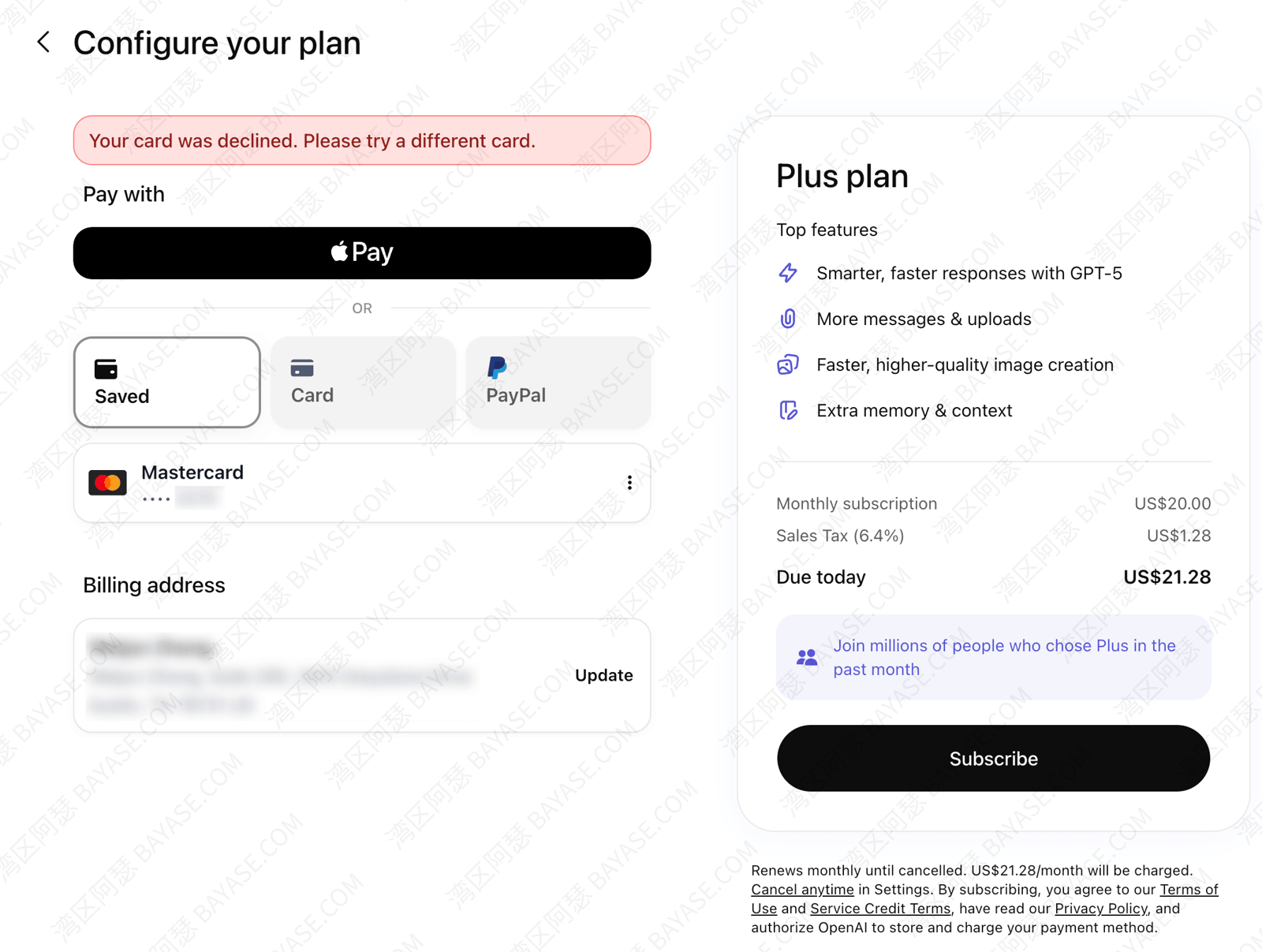
Trying to subscribe to ChatGPT Plus or Claude Pro and hitting “Your card has been declined” at checkout?
You're not alone — cards from many regions get declined, especially for AI subscriptions.
Some older virtual-card services have shut down new signups, and some crypto-backed virtual card options that used to work are getting harder to use.
If you're looking for a lower-friction way to bind your own card and pay for subscriptions, this guide is for you.
If you've been searching for roogoo, roogoo virtual card, or how to open a roogoo card, you're in the right place.
I tested Roogoo virtual cards in 2026 and put together the full path — what it is, whether it's legit, how to pick a card, and how to register, verify, top up, and subscribe to ChatGPT.
Sign up through the link in this article for $0 setup fee + new-user 0% fees + $1 signup cashback.
⚠️ Don't change the Roogoo invite code or referral link — that can affect your first-card perks.
You might be wondering:
I'll walk you through everything step by step.
Good fit: You want an easy-to-get virtual card, you're OK with ID verification, and you mainly need international subscriptions and online payments.
Not a great fit: You refuse KYC entirely, or you expect permanently zero cost with no transaction fees at all — that usually leads to disappointment.
| Factor | Roogoo (2026 test) |
|---|---|
| Setup fee | $0 on your first virtual card (limited-time perk; about $4.99 from the second card onward — check the app) |
| First top-up | ≥ $10 USD (I suggest $15–20 the first time for auth holds), then spend down |
| New-user perk | 0% fees for new users |
| Signup cashback | $1 USD cashback on card opening |
| KYC | ID / passport; Sumsub channel recommended |
| Top-up | USDT (TRC-20 / SOL, etc. — see the app) |
| AI subscriptions | Premium / Standard cards support OpenAI, Claude, etc. (Global card is not — see the table below) |
| Works well for | ChatGPT / Claude / Gemini, online shopping, games, Apple Pay |
| Poor fit for | Anyone who won't verify identity or accepts no normal card fees |
Want to lock in the perks and browse the app first? Register Roogoo here:
In plain terms, Roogoo is a USDT-funded, USD-denominated spending virtual card platform — often called a crypto-backed virtual card or USDT prepaid card in crypto communities. You deposit USDT on the Roogoo platform, and it issues Visa / Mastercard virtual cards whose number, expiry, and CVV you use for ChatGPT, Claude, overseas stores, Apple Pay, and more (depending on card type).
It's not the same as a bank-issued virtual credit card:
Roogoo card supports Apple Pay, Google Pay, PayPal, and similar options (varies by card). I've renewed ChatGPT with a Roogoo virtual card myself — this isn't theory.
You can sign up and look around without opening a card right away — many people use email to enter the Roogoo site, check rates and card types, then decide on KYC. You usually don't need full verification until you actually issue a card.
If you're asking is roogoo safe or is roogoo virtual card legit, you've probably seen too many “no-KYC miracle card” ads. My checklist matches our 2026 free virtual card platform guide:
Roogoo requires KYC. According to its public disclosures, it holds US FinCEN MSB registration (verify IDs and numbers on the official site/app yourself). Viewing the full card number also requires email verification — an extra step, but safer than platforms where anyone can see a CVV.
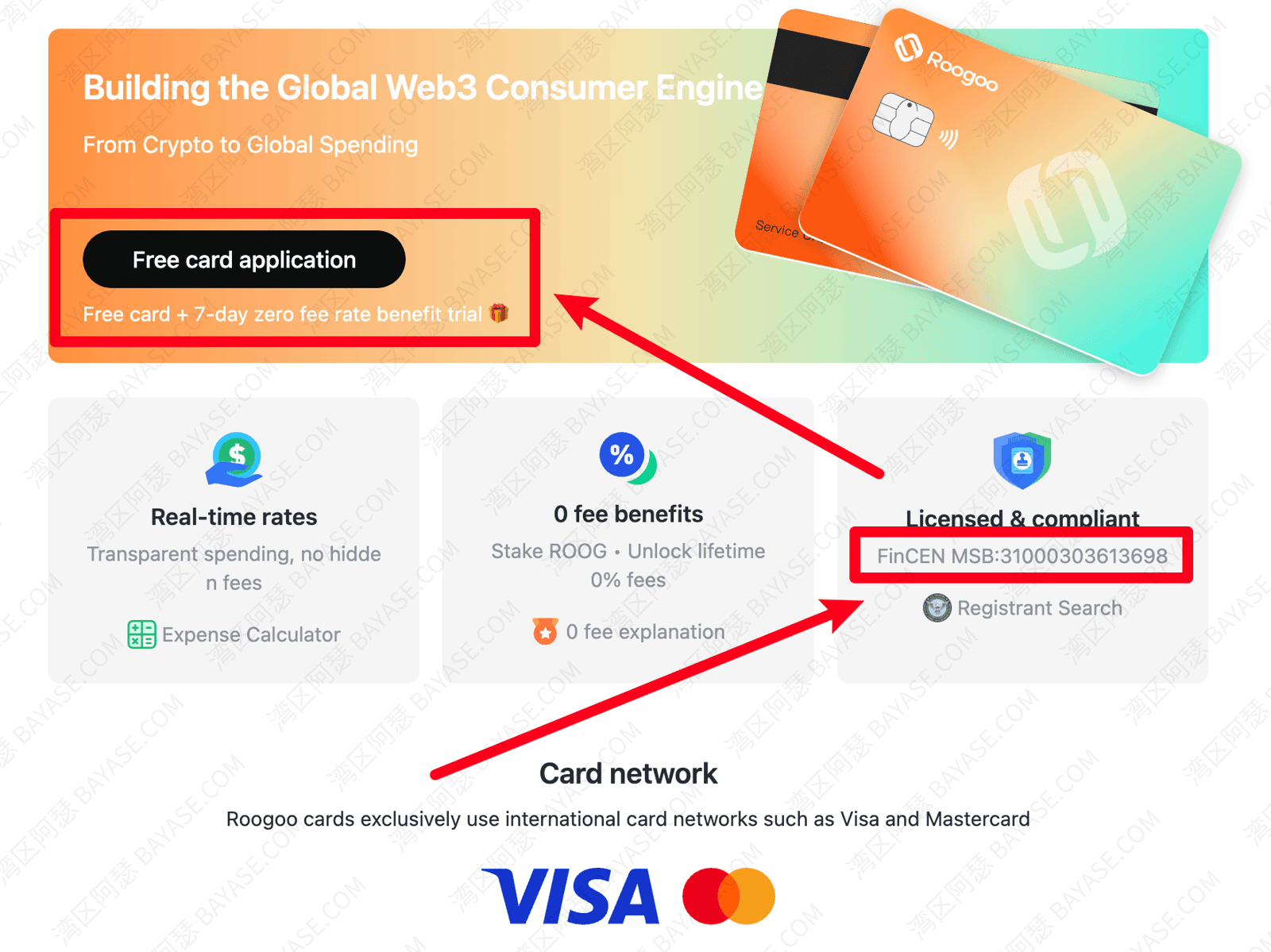
💡 Don't get this backwards: the more a platform lets you in with zero verification, the more cautious you should be. Stricter KYC often means a more compliant issuing path — though compliance ≠ zero risk. Virtual card policies change fast; no one can promise “never adjusts.”
Real risks to keep in mind:
I won't claim “100% subscription success.” But used correctly with the right card type, Roogoo virtual cards are one of the more straightforward options I'd suggest to beginners today.
Usually a good match if you:
Probably not for you if you:
The Roogoo platform offers three main virtual cards. Roogoo Premium is the one people ask about most for GPT. Here's how they compare (aligned with our 2026 free virtual card guide):
| – | Premium | Global | Standard |
|---|---|---|---|
| Network | Mastercard | Visa | Visa |
| Issuing region | US (Puerto Rico) | Hong Kong | US |
| Setup fee | $0 | $0 | $0 |
| First top-up | $10 | $10 | $10 |
| Top-up fee | – | – | – |
| Transaction fee | 1% | 0.8% | 1% |
| Cross-border fee (non-USD spend) | 1.6% | – | 1.6% |
| Auth fee (when charge < $30) | – | $0.35/txn | – |
| FX | Real-time rate | Real-time rate | Real-time rate |
| Apple Pay / Google Pay / PayPal | All supported | All supported | Apple Pay not supported yet; others OK |
| AI subscriptions | OpenAI API ✅ Claude AI ✅ Anthropic API ✅ Midjourney ✅ | OpenAI API ❌ Claude AI ❌ Anthropic API ❌ Midjourney ❌ | OpenAI API ✅ Claude AI ✅ Anthropic API ✅ Midjourney ✅ |
| Summary | Best for daily spend and AI subscriptions; smoother checkout | Better for larger general spend and travel | Daily + international online/offline spend and subscriptions |
⚠️ Rates in this table reflect what we referenced when writing. Roogoo card types and fees change — always trust what's shown in your app after signup. Use the in-app fee calculator before opening a card.
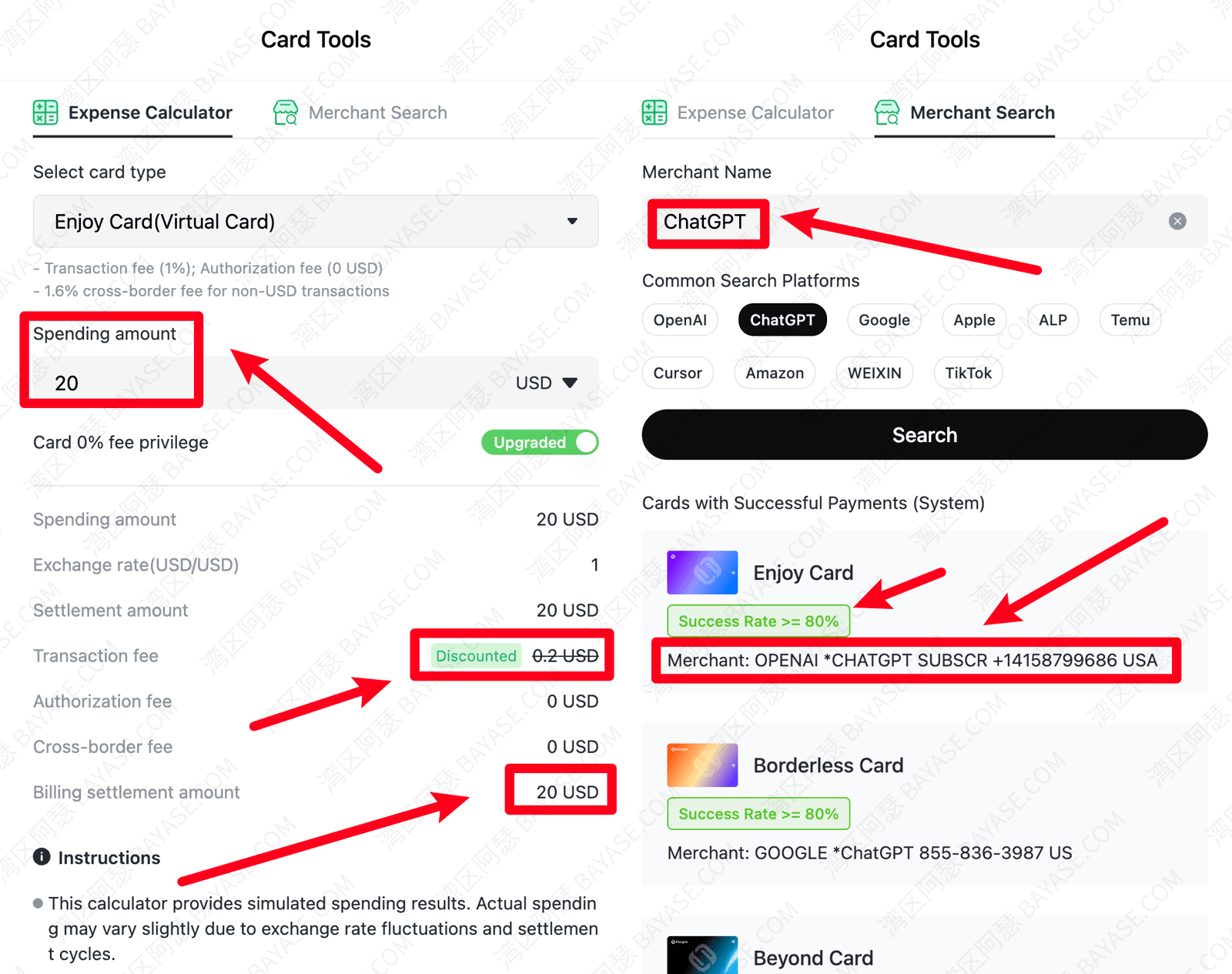
Register Roogoo through the referral link in this article for $0 setup fee + new-user 0% fees + $1 signup cashback:
My one-line picks:
More zero-setup-fee platforms: 2026 free virtual card platform guide.
| Entry | Notes |
|---|---|
| Roogoo official site | Browser signup and card issuance |
| H5 Roogoo | Mobile browser — no app install required (exact URL shown on the Roogoo platform) |
You can do everything on web/H5. ID verification may ask you to scan a QR code on your phone — follow on-screen prompts.
Roogoo mainly tops up with USDT. If you don't have USDT yet, you can register on a crypto exchange, buy USDT, and transfer it to your Roogoo wallet via TRC-20 or the network shown in the app. I use Binance — pick an exchange that works in your region if Binance isn't available where you live.
I suggest $15–20 USD equivalent on your first deposit — covers the $10 minimum plus a buffer for pre-auth holds when you subscribe.
roogoo virtual card signup through this article's link includes:
⚠️ Don't use bare links or edit the invite code manually — community reports say missing the referral channel can cost you the free first card.
Opening a roogoo card is usually six steps: register → verify → top up → pick card → review → spend. Below I follow my actual screenshots (roogoo virtual card registration starts at step 1).
Open the Roogoo referral link to claim $0 setup fee + new-user 0% fees + $1 signup cashback:
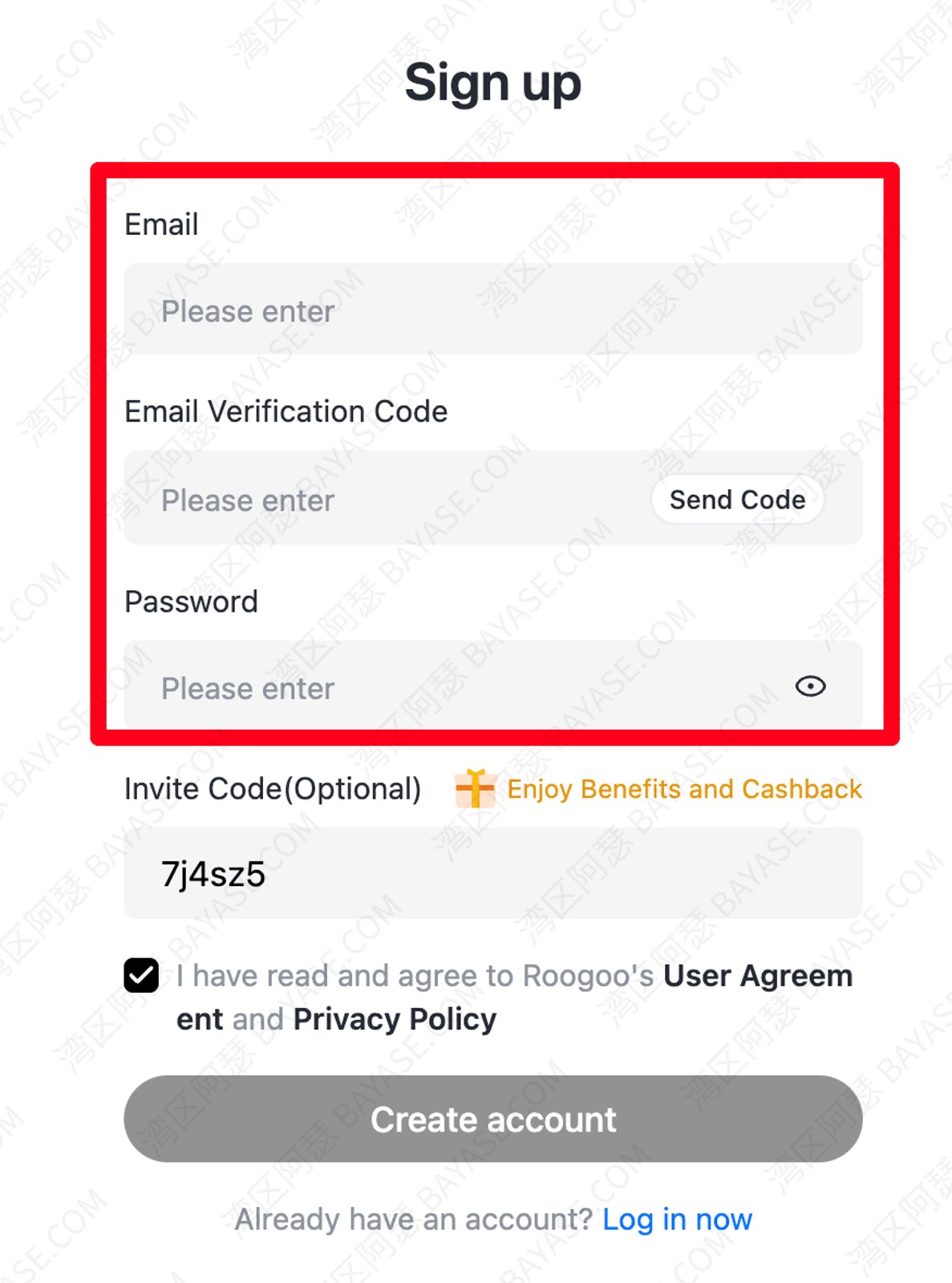
Use email signup. The invite code is prefilled — don't change it, or you may lose new-user perks.
Go to Settings → Identity verification and upload your documents. In my tests, approval usually takes 3–10 minutes; busy periods can be slower.
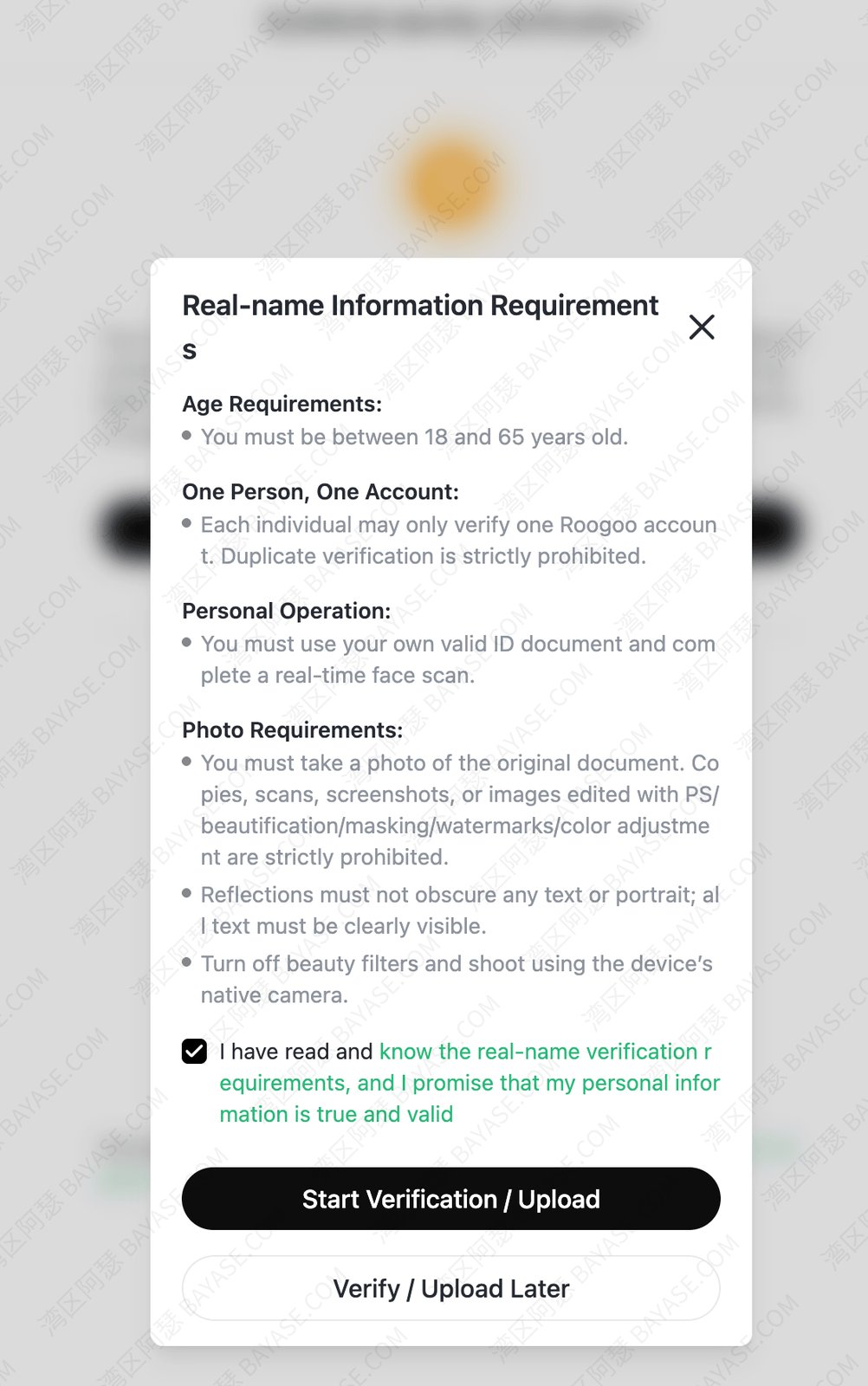
💡 Worried that KYC “gives away” your data? Flip it around: platforms that issue cards with no verification often have weaker oversight. I trust Roogoo more when it uses Sumsub and proper KYC.
Choose the Sumsub channel when offered — other international platforms may reuse it later.
First card issuance needs at least $10 USD (that balance sits on your card for spending). In your Roogoo wallet, pick USDT top-up — on-chain transfer or in-app purchase, per the current page.
Need help topping up? Register on Binance, buy USDT, confirm the deposit network in the Roogoo app, then send the transfer.
After verification and balance are ready, open the card page, choose Premium / Global / Standard (Premium or Standard for GPT), and take the $0 setup fee path:
See the three-card table above for differences. Confirm the first top-up amount and issue the card:
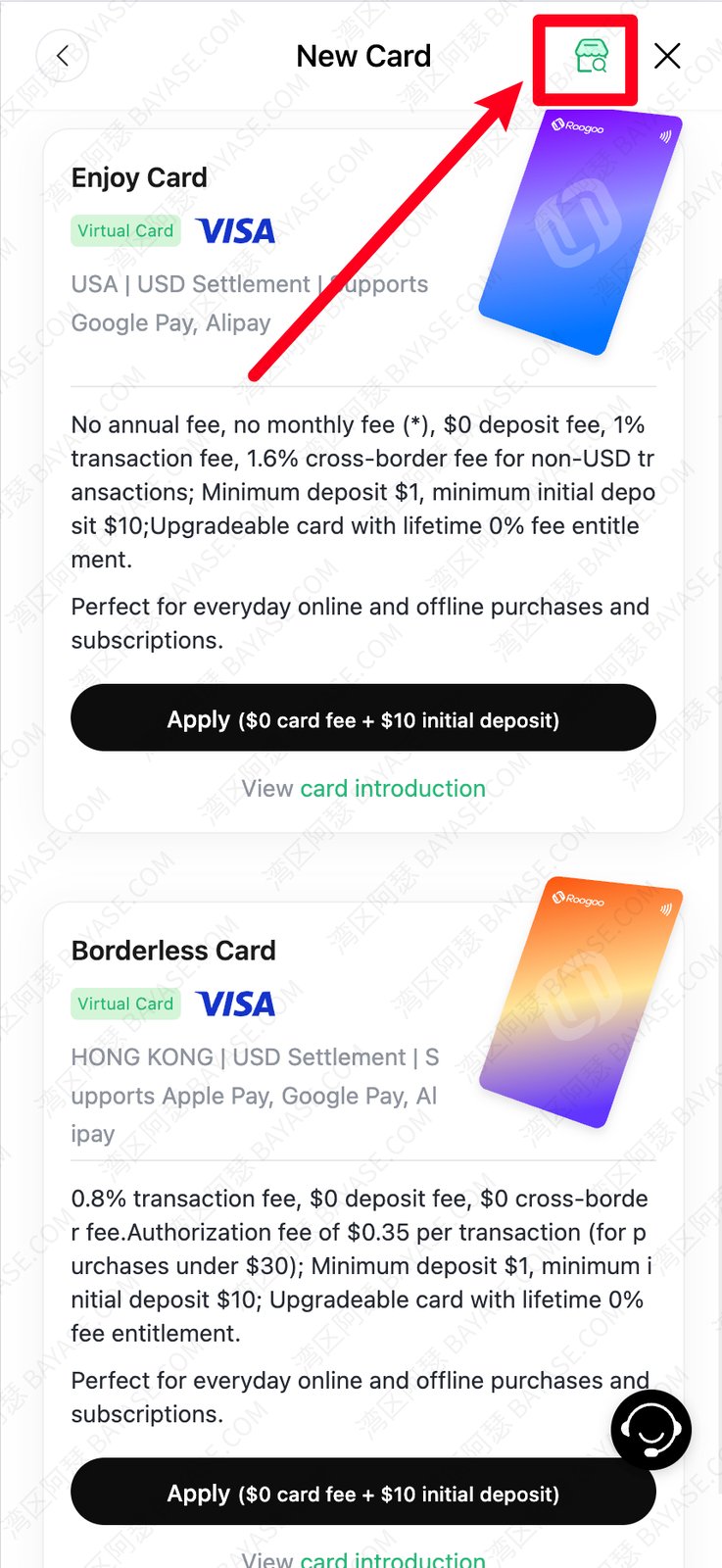
Enter billing/personal info accurately — saves headaches later.
Submit and wait for issuer review. Mine usually clears within 10 minutes.
Once approved, your first top-up lands on the card balance and you can spend:
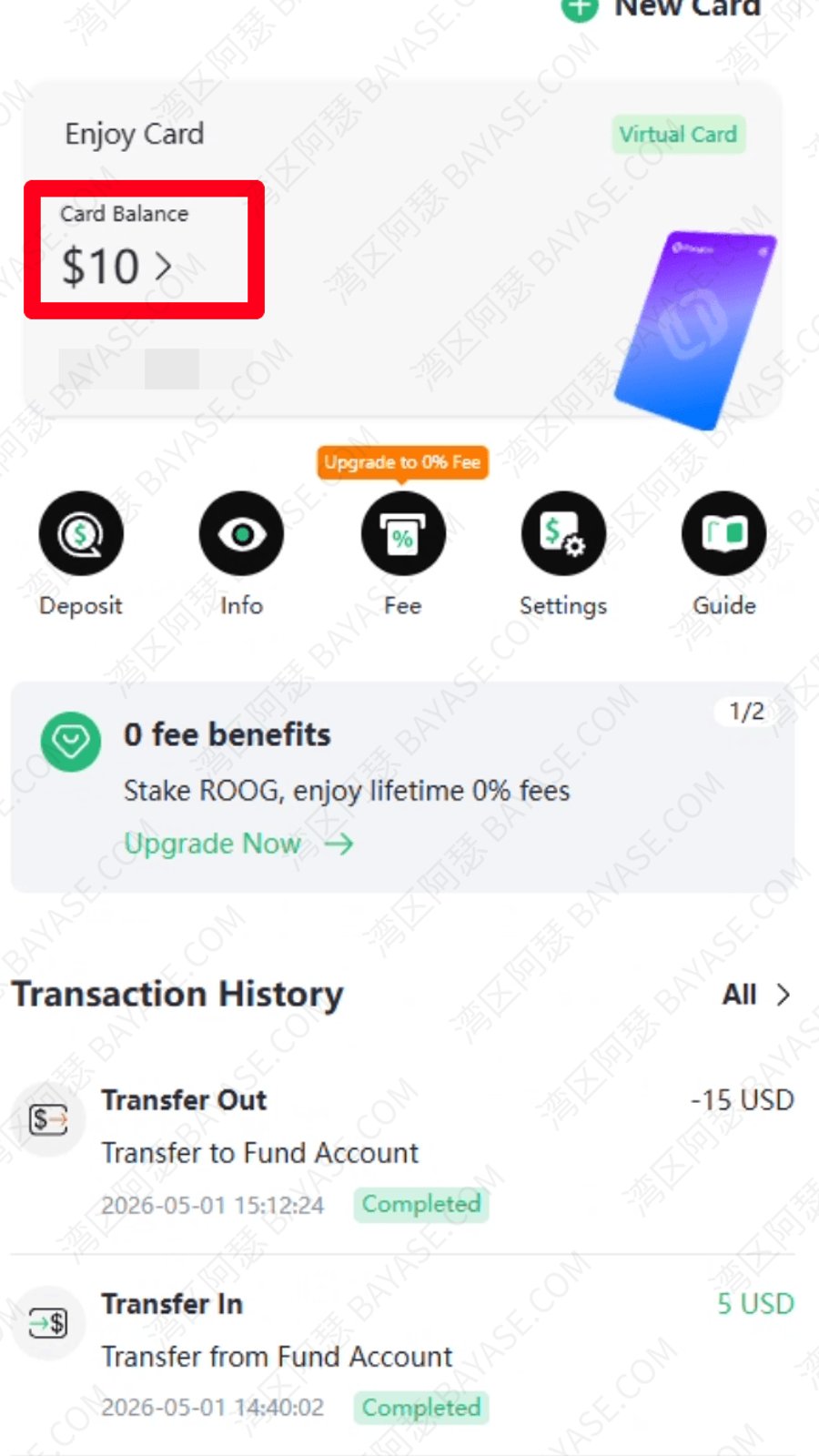
Tap “Card number” to view CVV (email verification required):
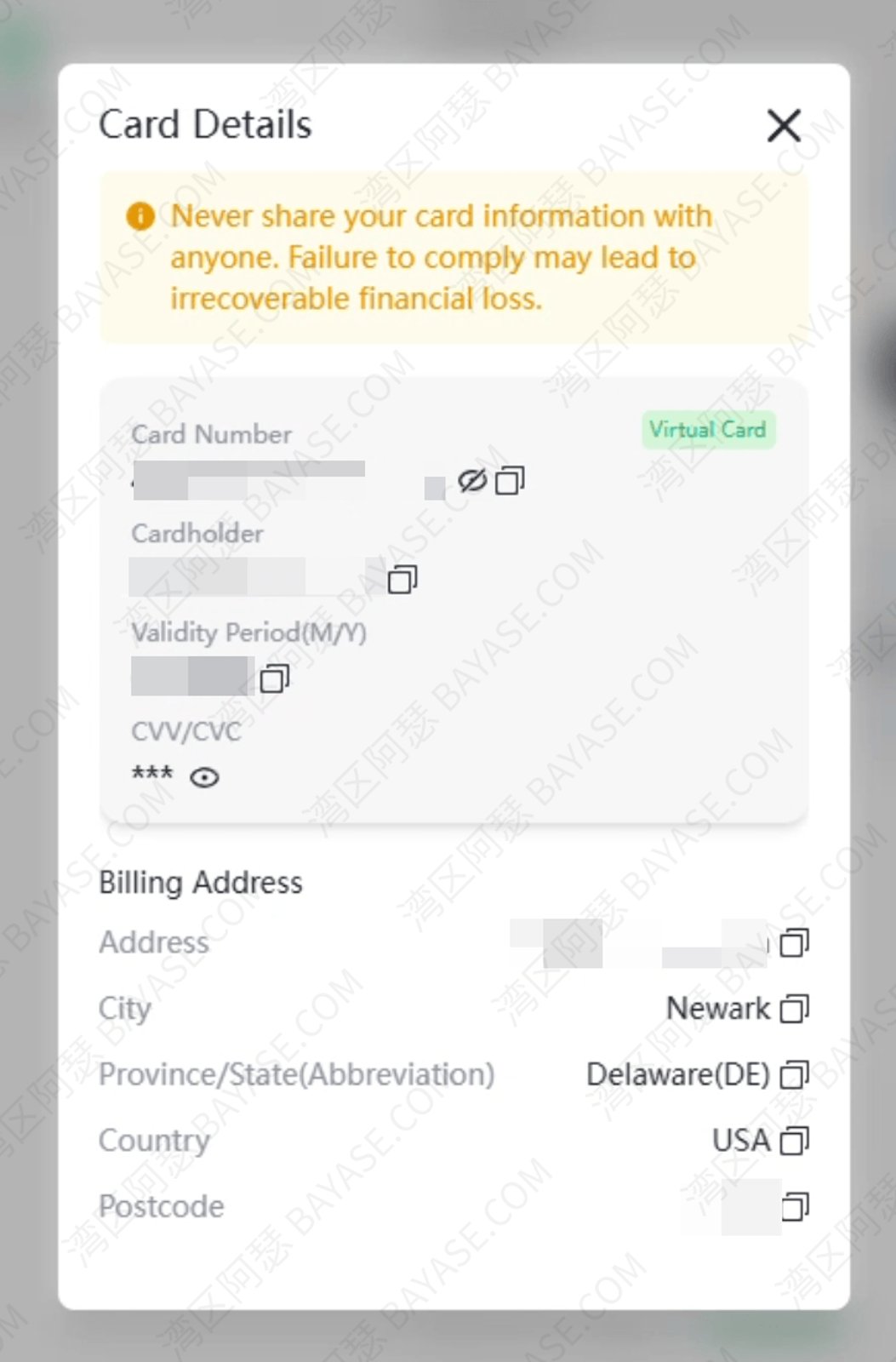
⚠️ Never paste card numbers or CVVs into chats or screenshots under cameras — leaks are hard to undo.
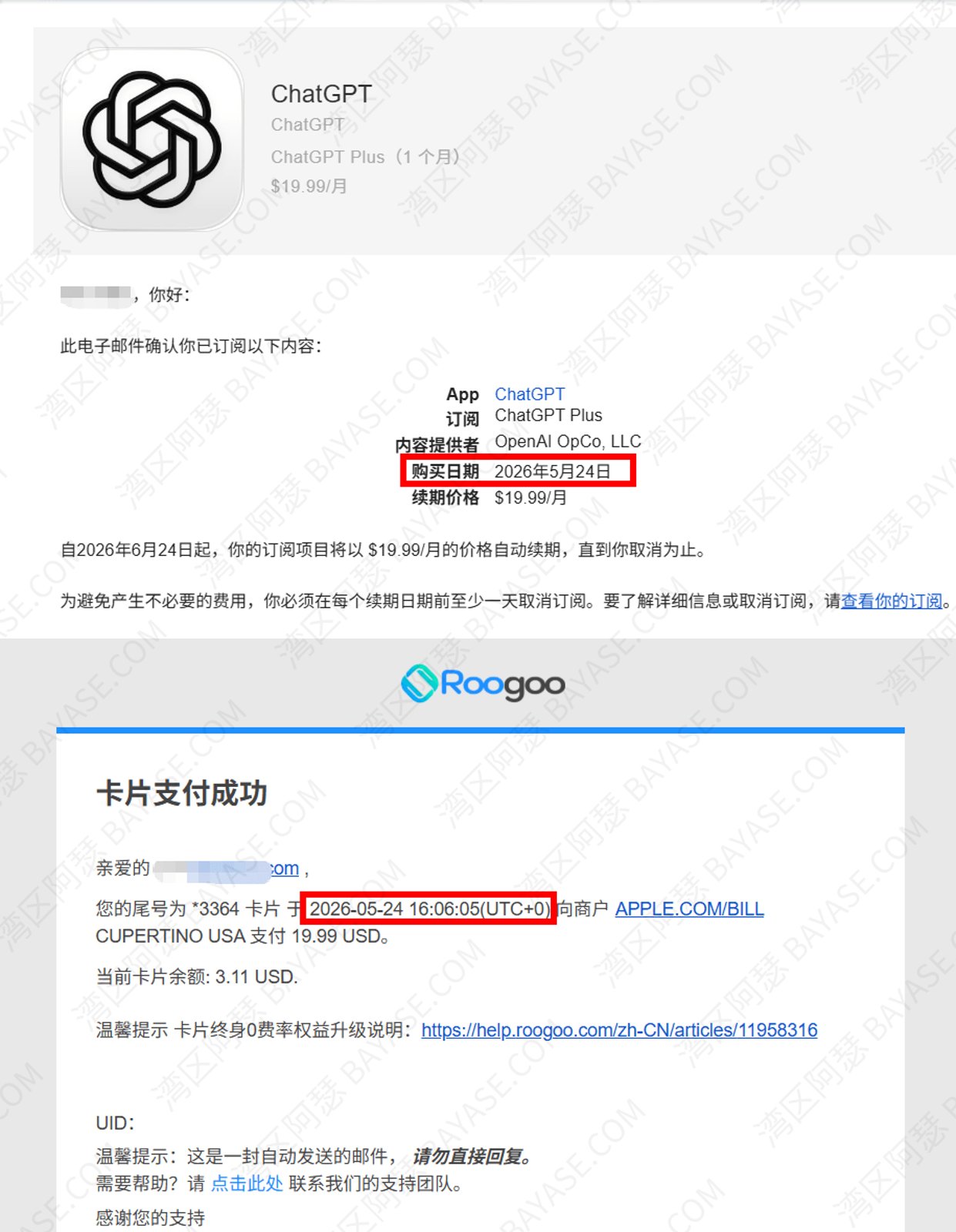
I tested a ChatGPT subscription with my Roogoo virtual card and confirmed the charge and fees looked normal:
This is what people searching roogoo virtual card gpt or roogoo virtual card openai care about most.
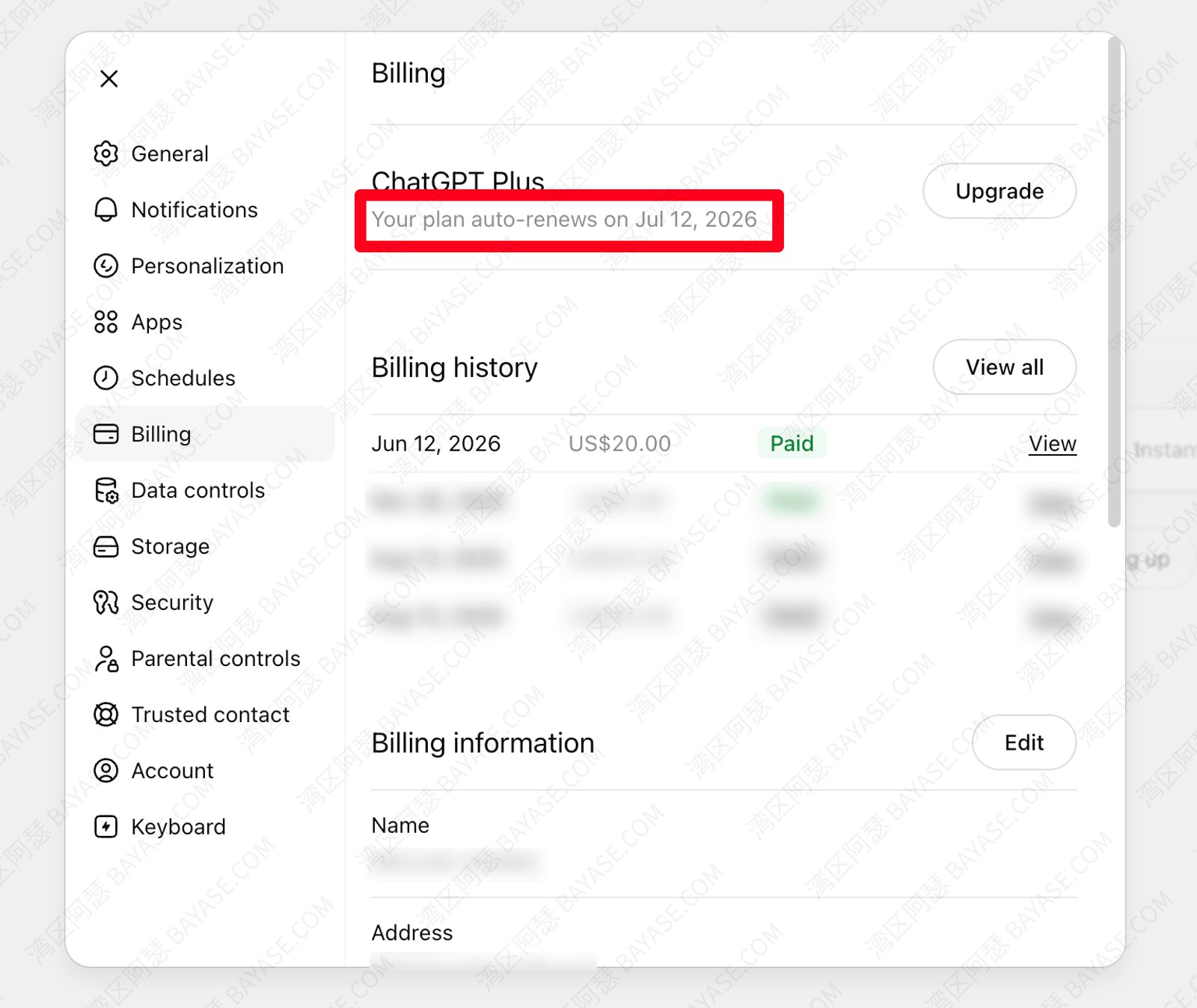
One more time: Premium or Standard; don't bind OpenAI / Anthropic with Global. Wrong card type wastes time even if you change network settings later.
Declined cards or Stripe errors? Full troubleshooting: ChatGPT Plus subscription guide (2026) — I won't duplicate that here.
Same flow: bind the same Roogoo card on claude.ai or gemini.google.com. Claude's card checks sometimes feel looser than OpenAI's, but keep $2–5 extra on the card anyway.
Your card has been declined doesn't always mean your card is broken. Common causes:
After 3+ failures in a row, wait 24 hours before retrying, or work through the decline troubleshooting guide.
Honestly, finding $0 setup + new-user 0% fees + $1 cashback on a virtual card in 2026 is already friendlier than a few years ago. Quick recap:
Need a virtual card you can use to pay for GPT yourself? Register Roogoo with the link below:
Open the Roogoo official site in a browser to register. The native app can be awkward to install — H5 in mobile Safari/Chrome works fine. Always enter through the official links in this article so perks apply.
With the Roogoo referral link here, the code is usually prefilled — don't edit it. Signing up via a bare search result can cost you $0 setup fee, new-user 0% fees, and $1 cashback.
Most of my approvals: 3–10 minutes. Blurry photos or peak times can take longer — usually same day. Sumsub is often faster and reusable elsewhere.
On-chain TRC-20 often 1–5 minutes; in-app purchase depends on channel. Top up, wait for balance, then open the card and subscribe — avoids “insufficient balance” errors from stale UI.
Your first virtual card can be $0 setup through the referral channel (limited time). Second card onward is about $4.99 per the Roogoo site. $0 setup ≠ zero lifetime cost — normal transaction fees still apply (see the table).
After registering and opening a card via the Roogoo link in this article, new users get 0% fees for a limited period. Scope and duration are in the app — check the perks page yourself; don't rely on rumors.
Complete registration and card opening via the Roogoo signup link, meet the campaign rules in the app, and $1 cashback posts per platform policy. If it's missing, read the promo details in-app or contact support.
Premium and Standard support OpenAI / Claude / Midjourney subscriptions; Global does not. This is the #1 roogoo virtual card gpt mistake — wrong card, failed checkout.
I don't recommend hunting “no verification” platforms. Judge Roogoo virtual cards on compliance disclosure, KYC requirement, and real success stories. Fully anonymous card mills tend to carry more risk — licensed platforms that require KYC usually plan to stay around. For international online spending, completing KYC properly is usually the steadier path.
No platform can promise they'll never shut down. Roogoo discloses MSB registration and requires KYC — more transparent than random no-name sites. Policies shift — don't over-deposit; treat your Roogoo virtual card as a payment tool, not a savings account.
Different top-up methods, fee structures, and usage patterns. Bybit Card faces regional restrictions and isn't always accepted for AI subscription merchants; Roogoo virtual cards focus on USDT top-up plus multiple Visa/Mastercard options — better for AI subscriptions, shopping, and everyday international pay. Compare fees in each app; this article doesn't link to other platforms' signup pages.
That's the end — thanks for reading!
Here are some communities created by Arthur. Feel free to join if you're interested:
The Telegram groups have fewer chat restrictions. Just add the bot and select the type of community you'd like to join:

You can also add Arthur as a Telegram contact:

Connect with Arthur and stay closer.
Disclaimer: The content of this article reflects personal opinions only. Any financial actions taken based on this information are at your own risk, and any resulting losses shall be borne solely by the operator.