加群或其他问题可扫二维码添加阿瑟

加群或其他问题可扫二维码添加阿瑟

Opened a Hong Kong bank account but unsure when to use FPS, eDDA, CHATS, or SWIFT? This guide maps everyday transfers, broker deposits, local large FX moves, and outbound remittances—fees, timing, and common traps like failed eDDA auth or sending local USD via SWIFT by mistake.

You’ve got the Hong Kong bank account. Now you’re stuck on transfers.
Paying a friend a few hundred dollars and you don’t know which rail to use. Funding a broker and the app throws eDDA, FPS, local transfer, and wire at you. Someone says “just use SWIFT” for a larger amount or a USD move—so you tap it. Extra fees show up, the money is slow, and only later you learn there was a better local option between Hong Kong banks.
I’ve paid that tuition more than once.
You’re probably stuck on questions like these.
I won’t re-cover account opening here—see Hong Kong bank account opening guide. This piece is about one thing: how to choose a Hong Kong bank transfer rail once the money is already in your HK card—everyday repayments, broker funding, large local moves, and outbound remittances.
TL;DR: Local small amounts → FPS (Faster Payment). HKD broker deposits → prefer eDDA. Large or FX moves between two Hong Kong banks → check CHATS / local express first, don’t default to SWIFT. Money leaving Hong Kong → then SWIFT. Cards I often pair: HSBC Hong Kong / ZA Bank. Brokers I use often: Chief Securities, Fosun Securities. Test small before a big send. Count fee + cable + intermediary + FX spread—not just “free transfer.”
Here’s the cheat sheet I use.
Local small money → FPS. Platform funding → eDDA. Local large / multi-currency → CHATS. Leaving Hong Kong → SWIFT.
| Method | Best for | Common currencies | Timing (typical) | How to think about cost |
|---|---|---|---|---|
| FPS Faster Payment | Local repayments, small moves | HKD, CNY | Often near-instant | Personal local transfers often free |
| eDDA express deposit | Broker / wallet pull after auth | Mostly HKD | Often minutes after auth works | Usually no separate deposit fee |
| CHATS / RTGS | Large or FX between HK banks | HKD, USD, EUR, CNY | Often same day in banking hours | Depends on bank, channel, account tier |
| SWIFT wire | HK bank ↔ overseas bank | Mainly FX | Often several business days | Fee + cable + intermediary + FX |
Don’t treat someone else’s “free and instant that one time” as your default. Limits, fees, and cut-offs are whatever your bank app shows. And don’t tap SWIFT on instinct for local USD—more on that below.
The first time FPS shows up in a bank app, people freeze: what is FPS?
It’s Hong Kong’s Faster Payment System—local real-time rails built by the HKMA. Most banks and e-wallets plug in. You can pay with a phone number, email, FPS ID, or account number, so you’re not always pasting a long account string.
Paying friends back, or moving a few thousand between two HK cards, is where I default to FPS. It’s available 7×24, and personal local transfers are often free.
Two traps show up again and again.
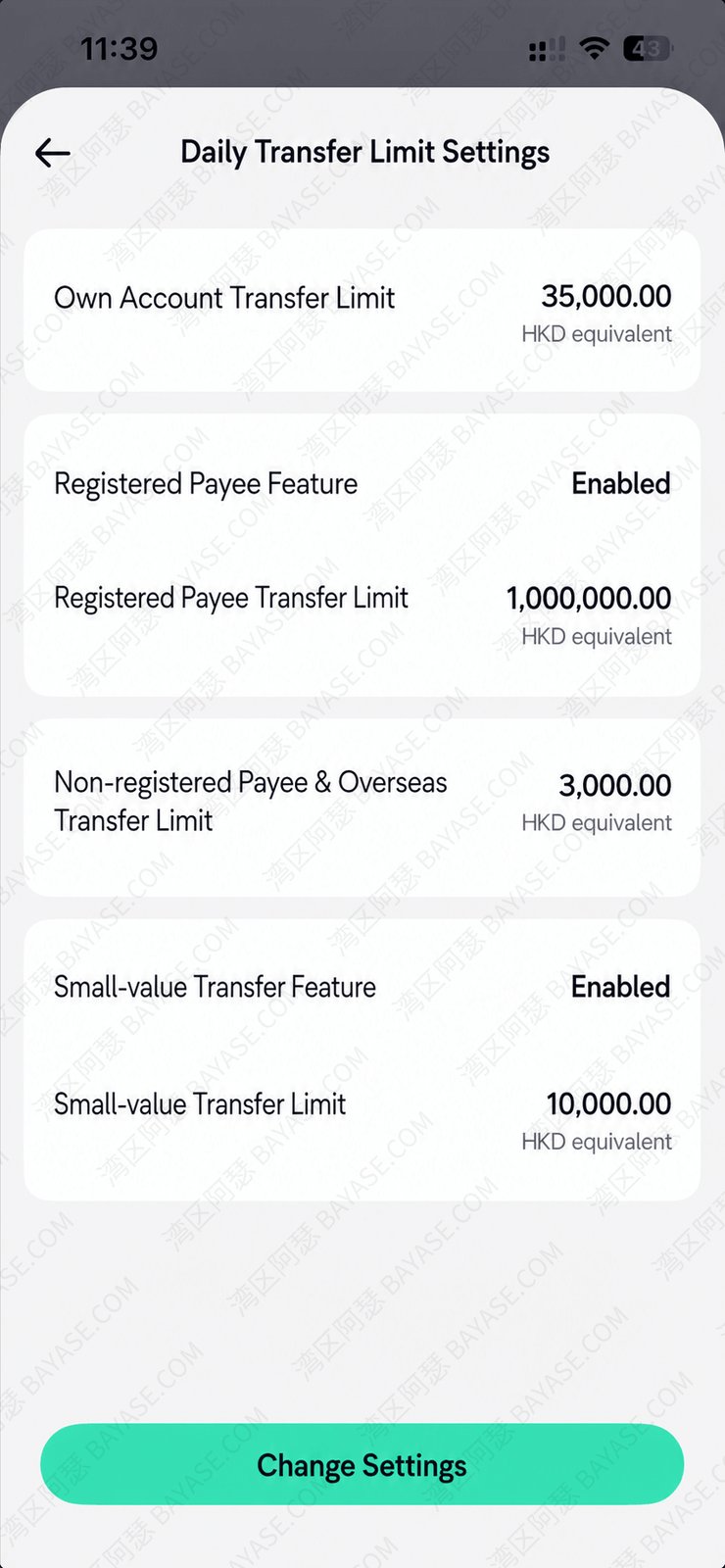
First: FPS transfer limits. There’s no single Hong Kong-wide number. Daily caps differ a lot by bank.
Some apps look capped around ten thousand HKD; others let you raise to the low hundreds of thousands, depending on account tier and the limit you set yourself.
Check the bank app the day before a large send. Half the time the setting lives under account / limits. Don’t discover you can’t send when you already need the money out.
Example with ZA Bank Hong Kong. Open the home screen, tap the avatar top-left, go into FPS and transfer settings, then limit settings—you’ll see options like the ones below.
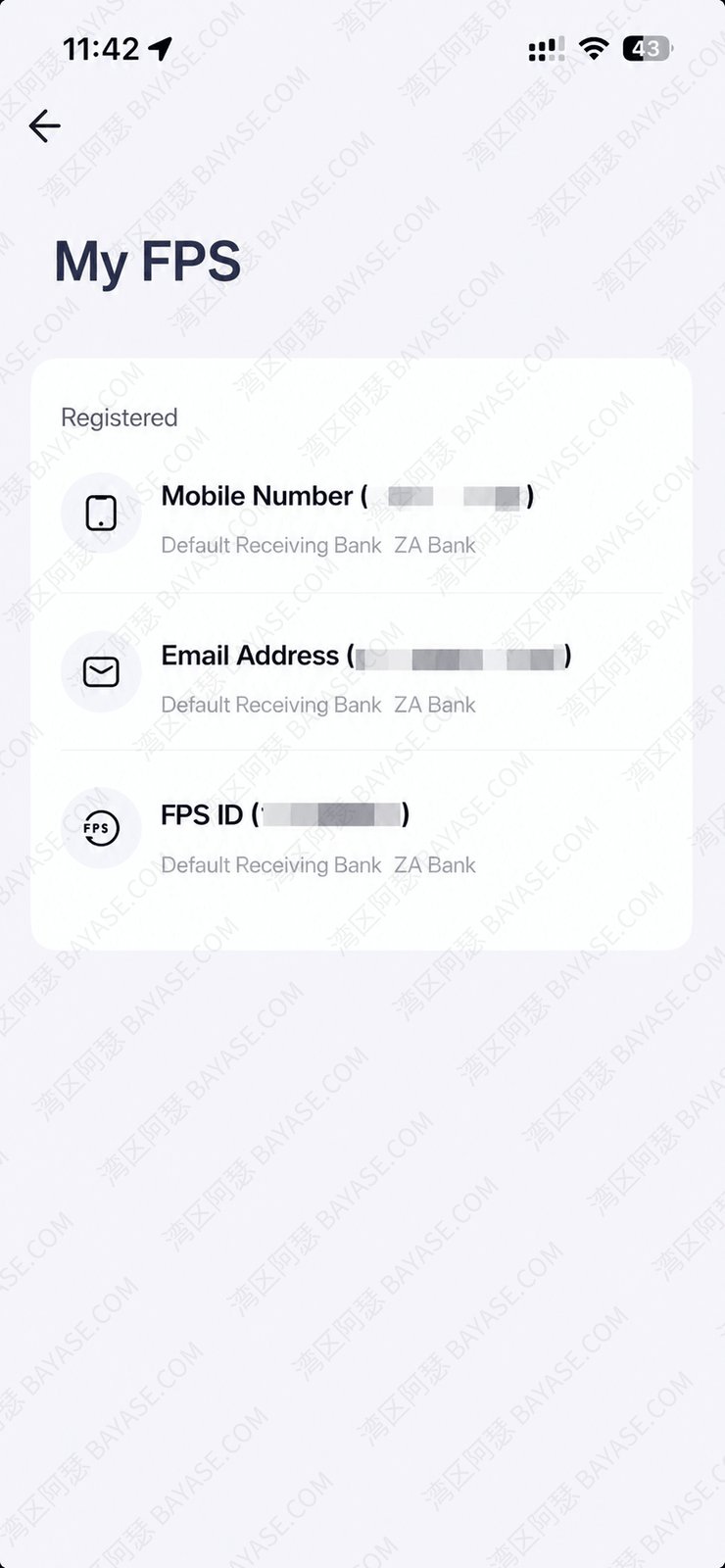
Second: default receiving account. The same phone number may be registered for FPS at several banks.
Where the money lands depends on which account is currently set as default. For a new payee, match the name, then send a small test first.
Again with ZA Bank: home screen → account (top-right) → account info → My FPS, and you’ll see the current registration.
FPS is strong on its home turf: local small amounts. Don’t expect it for outbound remittances. Manual FPS into a broker can work, but some platforms still ask for screenshots and manual checks—usually worse than eDDA when that’s available.
If you’ve used ACH debit in the US—authorizing a broker, payroll app, or bill pay to pull from your bank—the idea will feel familiar. In Hong Kong, brokers often don’t want you to push money manually every time. They ask you to authorize first—and that’s when people ask what an eDDA deposit means.
In short: you authorize first, then the broker or wallet can pull from the linked HK account under the rules you approved. Later you enter an amount in the broker app and the bank pays it—no jumping back to online banking for each send.
So “Hong Kong eDDA” is roughly “authorized bank-to-broker pull after you approve the mandate.” When a broker says “express deposit via eDDA,” it’s usually the same idea. Under the hood it still rides FPS rails.
eDDA funding is four words: authorize first, pull later.
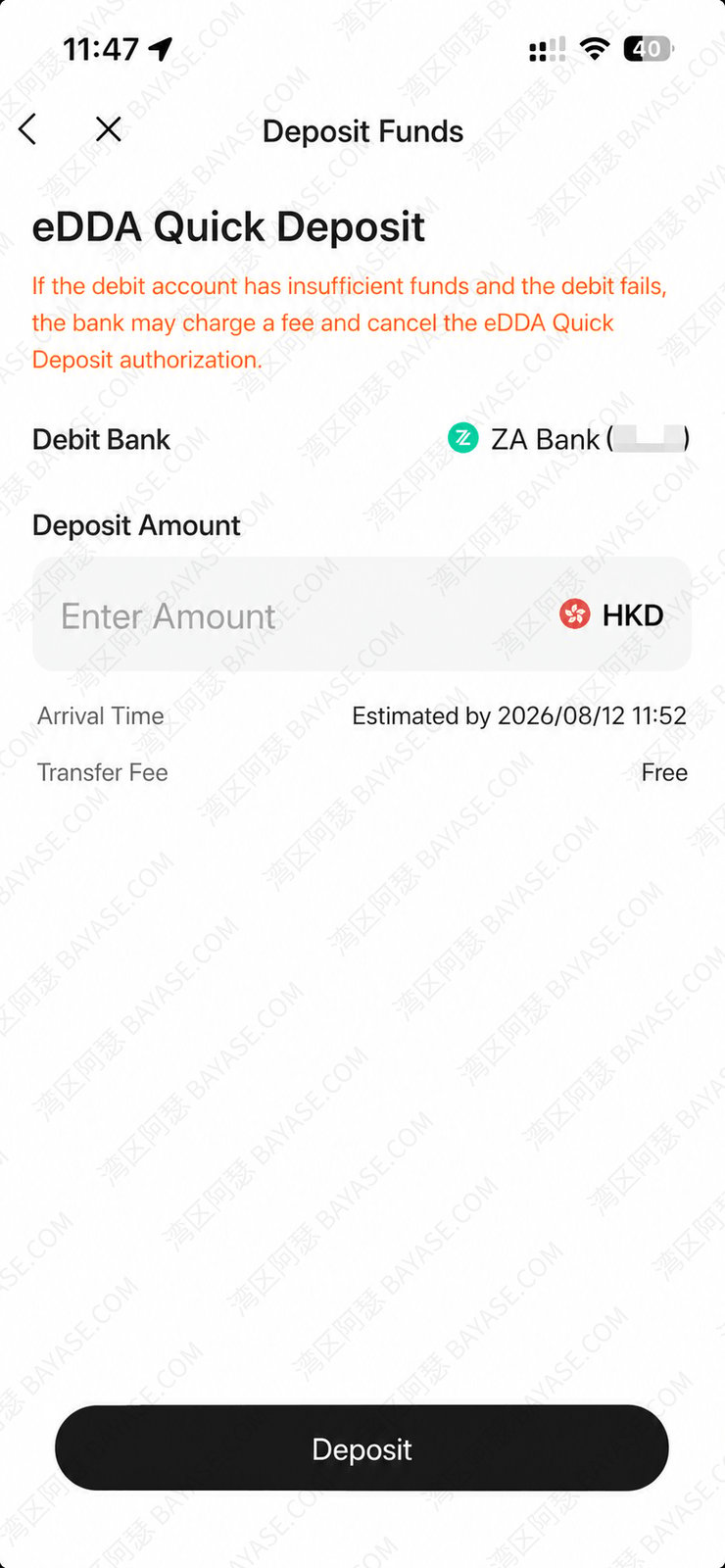
Why brokers push express deposit: the “express” part. It skips typing account numbers, screenshotting, and waiting on manual review.
For HKD, when authorization is clean, money often lands in minutes, typically with no separate fee.
When I walk people through this, I usually bind ZA Bank or HSBC Hong Kong to the broker. Step-by-step screenshots and USD online-banking deposits are in how to deposit from bank to brokerage. For broker-side setup, see Fosun Securities account opening. On HSBC fees and account tiers, HSBC One account fees is worth a skim.
Most eDDA pain is at authorization. Don’t keep resubmitting. Check these three first.
One more ops tip. Don’t start eDDA if the balance isn’t enough—especially on HSBC. Some banks charge a failed-debit fee.
I’ve seen roughly HKD 165 charged that way. First time it happens, ask support about a refund; don’t assume you’re stuck with it.
For most overseas customers, the primary ID at a Hong Kong bank is a passport. Always follow what your bank actually registered—then pick the same type on the broker form.
| Bank | Common primary ID (overseas customers) | What to pick for eDDA | Guide |
|---|---|---|---|
| HSBC Hong Kong | Passport (and whatever else the bank collected at opening) | Match the bank-held ID—usually passport | HK bank opening overview |
| Bank of China (Hong Kong) | Passport / ID as registered | Match bank registration | Online opening notes |
| ZA Bank | Passport / ID as registered | Match bank registration | ZA Bank opening guide |
| Standard Chartered Hong Kong | Passport first in many overseas cases | Follow bank-held ID | Online opening notes |
| Hang Seng Bank | Passport / ID as registered | Match name, then bank-held ID | HK / Macau bank opening |
One rule covers almost every case: whatever ID the bank holds, tick the same type at the broker. More opening detail: 2026 Hong Kong bank opening guide and online opening for HSBC, BOCHK, ZA, Standard Chartered. Fee context for HSBC One: HSBC management fee in Hong Kong.
Among setups I see often: Chief Securities and Fosun Securities.
Licensing is clear, eDDA hooks are relatively mature, and once auth works, funding gets much less painful. Opening walkthroughs: Chief Securities, Fosun Securities (also Fosun wealth opening guide).
注册/登录页面填写(重要,后续无法补),获得官方奖励(见海报)
Click to copy注册/入金前输入,注意此为终身免佣+额外300港币必填邀请码
Click to copyThink of CHATS as Hong Kong’s large-value clearing rail between local banks—RTGS under the hood. HKD, USD, EUR, CNY and similar often use it when you move money between two Hong Kong banks. Apps rarely label the button “CHATS.” You’ll see bank account transfer or local payee transfer instead.
Here’s a misread I see constantly.
Someone hears “USD,” and their finger goes straight to SWIFT. If the receiving bank is also in Hong Kong, pause.
Open your bank app and look for local bank transfer, express transfer, RTGS / CHATS-type wording. If the local rail works, it’s usually cheaper and faster than an international wire.
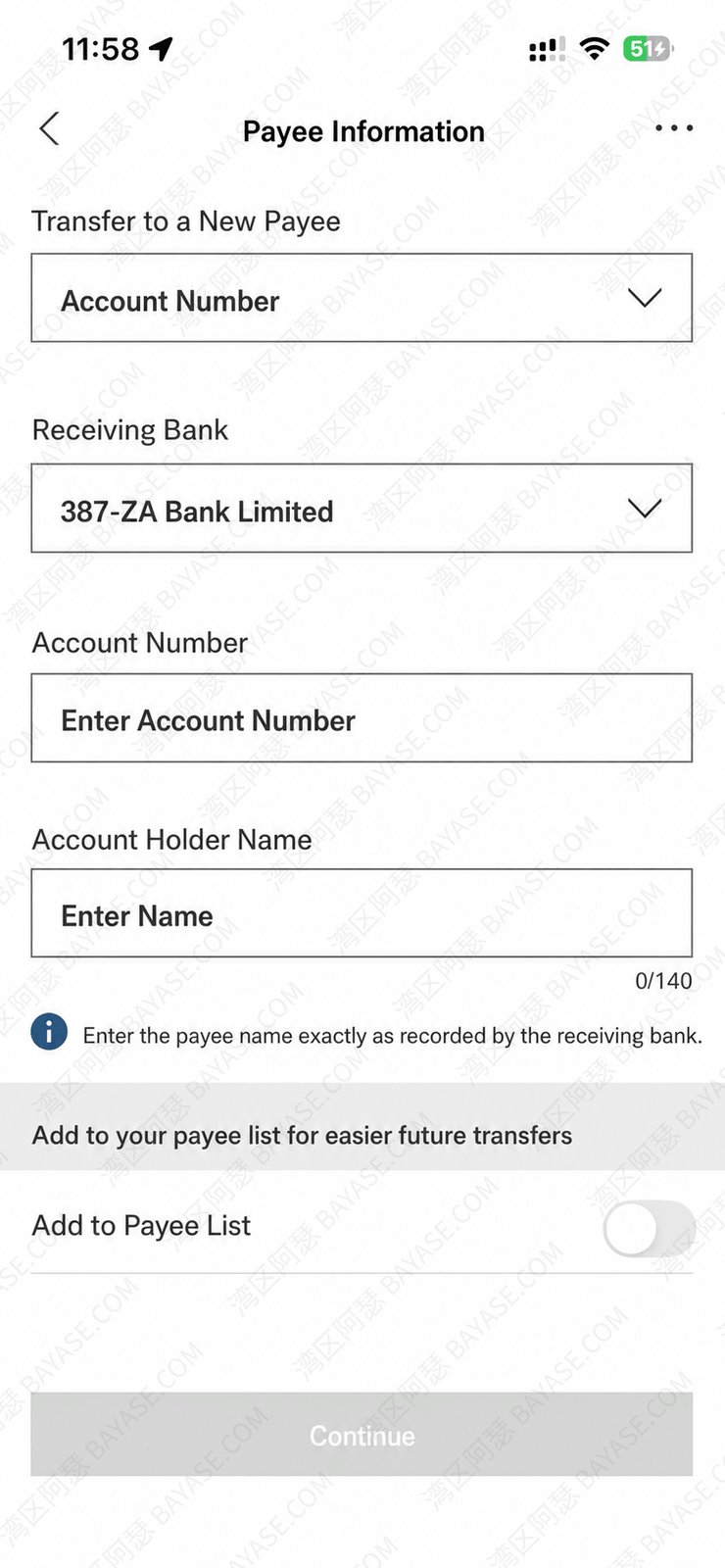
Before I send, I check these myself.
Fees vary a lot. Some same-bank or preferred pairs are friendlier; cross-bank can land in the tens to low hundreds of HKD. Use your bank’s fee table—don’t memorize blog numbers.
You almost never see a button that literally says “CHATS transfer.” The UI usually says bank account transfer or local payee transfer. Get payee bank, name, and account number right, or it won’t go through.
Tuition, overseas accounts, a receiving bank outside Hong Kong—this is when SWIFT earns its keep.
Coverage is wide; the downside is real. Costs rarely fit in one line item. Sending-bank fee, cable, intermediary deductions, receiving-bank credit fees, FX spread—each can take a bite. Intermediary fees are especially annoying; you often can’t quote them precisely in advance.
The screenshot below is what I filled when sending from HSBC Hong Kong to Ant Bank Macau—classic SWIFT fields.
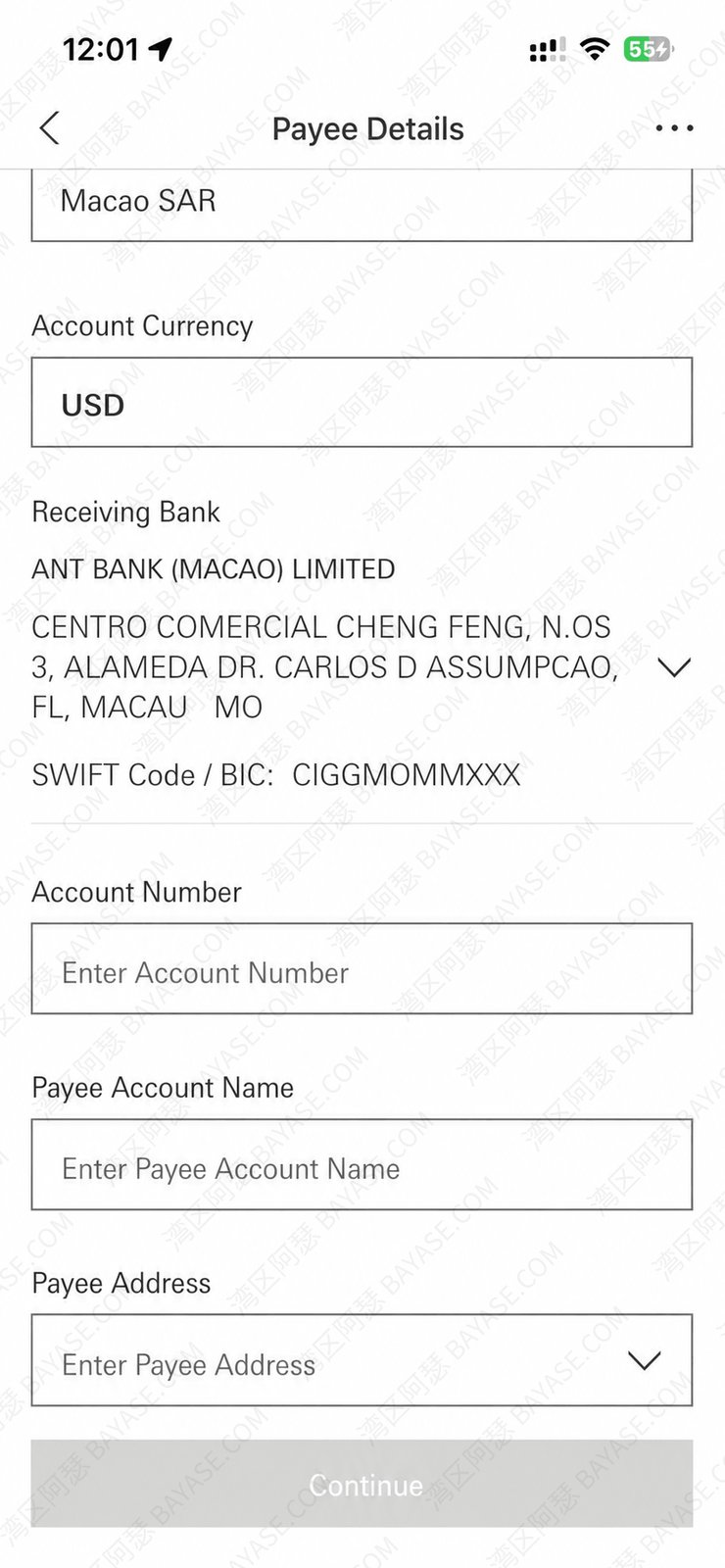
Before a live wire, prepare the list.
Confirm purpose and details, then send the real amount. For a new counterparty, I still test small first.
Don’t split into many tiny wires just to “look smaller.” Banks look at frequency, relationship, and whether the source of funds makes sense—not only single-ticket size.
Full SWIFT walkthrough into Ant Bank Macau: Ant Bank Macau funding guide.
Use FPS. Simple, often free, works at night.
Check for eDDA first. Park cash in HSBC Hong Kong or ZA Bank, then use a broker that supports authorized debit such as Chief Securities / Fosun Securities. Authorize once; less friction later.
Not on ZA yet? See ZA Bank opening guide. No HK card yet but still want to fund a broker? See funding without an HK bank card.
注册开户时填写,注意观察邀请码填写框,后续不可补
Click to copyExample: main cash in bank A, need a large HKD or USD ticket into bank B for a time deposit. Prefer CHATS / local express. Don’t default to SWIFT as a detour.
Overseas tuition, overseas accounts, a receiving bank outside Hong Kong—use the Chapter 5 checklist and SWIFT.
Same logic in reverse: when you’re moving overseas funds into a Hong Kong bank, or sending money from Hong Kong out to an overseas account, treat it as a cross-border remittance problem. Stay on FPS / eDDA / CHATS only while both ends sit inside Hong Kong; once funds cross the border, plan for SWIFT (and the fee stack in Chapter 7).
There’s no universal “cheapest” answer. What matters is how much lands.
| Cost type | Where it shows up | How to read it |
|---|---|---|
| Local bank fee | CHATS, branch | Personal vs corporate, e-channel vs counter, currency and size |
| Cable / messaging | SWIFT, amendments, queries | Fee table |
| Intermediary / receiving bank | Most common on SWIFT | Bad fee option → smaller credit |
| FX spread | Any conversion | Fee can be “0” while the rate is still poor |
If you juggle currencies often, a bank with a stronger international network can save headaches. I often keep HSBC Hong Kong as one multi-currency base—your habits may differ. On HSBC One fees specifically, see HSBC management fee in Hong Kong.
Timing follows the same logic. FPS is usually fast. eDDA depends on bank–broker pairing. CHATS depends on banking hours and cut-offs. SWIFT stacks intermediaries, holidays, and compliance reviews. If there’s a hard deadline—IPO funding, bills, tuition—don’t bet the last day on “expected today.” Leave a day or two of buffer.
When you’re about to transfer, walk these three checks instead of tapping by feel.
If you still need a card setup, compare HSBC Hong Kong and ZA Bank for daily transfers. For broker funding, confirm your card can link eDDA to Chief Securities or Fosun Securities. One clean authorization beats screenshot-and-upload forever.
Still opening, or want screenshot-level funding steps? Continue with Hong Kong bank opening guide and bank-to-brokerage deposit guide. Bookmark this page for the next time the app menu freezes your brain.
Hong Kong’s Faster Payment System from the HKMA. Most banks and e-wallets connect to it. You can send with a phone number, email, or FPS ID. Personal local transfers are often free. That’s what people mean by Faster Payment in Hong Kong.
Electronic Direct Debit Authorization. After you authorize a broker or wallet, the platform can pull from your linked HK account under the rules you approved—without you opening online banking every time. Under the hood it still uses FPS rails.
No single number. It depends on the bank, account tier, and the limit you set in the app. Daily caps commonly range from about HKD 10,000 to HKD 300,000. Check the live figure before a large send.
Funding a securities or wallet account via eDDA. After broker-side authorization, later deposits are pulls from the linked bank account. Match ID type and English name before you authorize to avoid most failures.
A payment or transfer that settles over Hong Kong’s Faster Payment System. Local use is usually fast, often free for personal customers, and available at night.
FPS is you pushing money out. eDDA is you authorizing first, then the broker or wallet pulling from the linked HK card under the rules. They often share Faster Payment rails, but who initiates differs. Everyday repayments → FPS. HKD broker funding → prefer eDDA when available.
That's the end — thanks for reading!
Here are some communities created by Arthur. Feel free to join if you're interested:
The Telegram groups have fewer chat restrictions. Just add the bot and select the type of community you'd like to join:
You can also add Arthur as a Telegram contact:

Connect with Arthur and stay closer.
Disclaimer: The content of this article reflects personal opinions only. Any financial actions taken based on this information are at your own risk, and any resulting losses shall be borne solely by the operator.